MyHub+

Main Menu

  • Value Drivers
  • Hubs
    • Global Trade Hub
    • Forwarding Hub
    • Warehousing Hub
    • Distribution Hub
  • Resources
    • Blog
    • Case Studies
  • Contact Us

logo

  • Value Drivers
  • Hubs
    • Global Trade Hub
    • Forwarding Hub
    • Warehousing Hub
    • Distribution Hub
  • Resources
    • Blog
    • Case Studies
  • Contact Us
blog
Home›blog›Process Bulk Inward Orders in record time

Process Bulk Inward Orders in record time

By MyHub+
March 24, 2023
363
0
Share:

Is creating inwards one at a time eating into your valuable time? Too many orders to update but too little time.

Here is a brand new feature to your rescue! “Batch Upload” lets you create inward orders in bulk in no time. Don’t worry if you have orders piled up, just use the feature and get your work done.

How to do it?

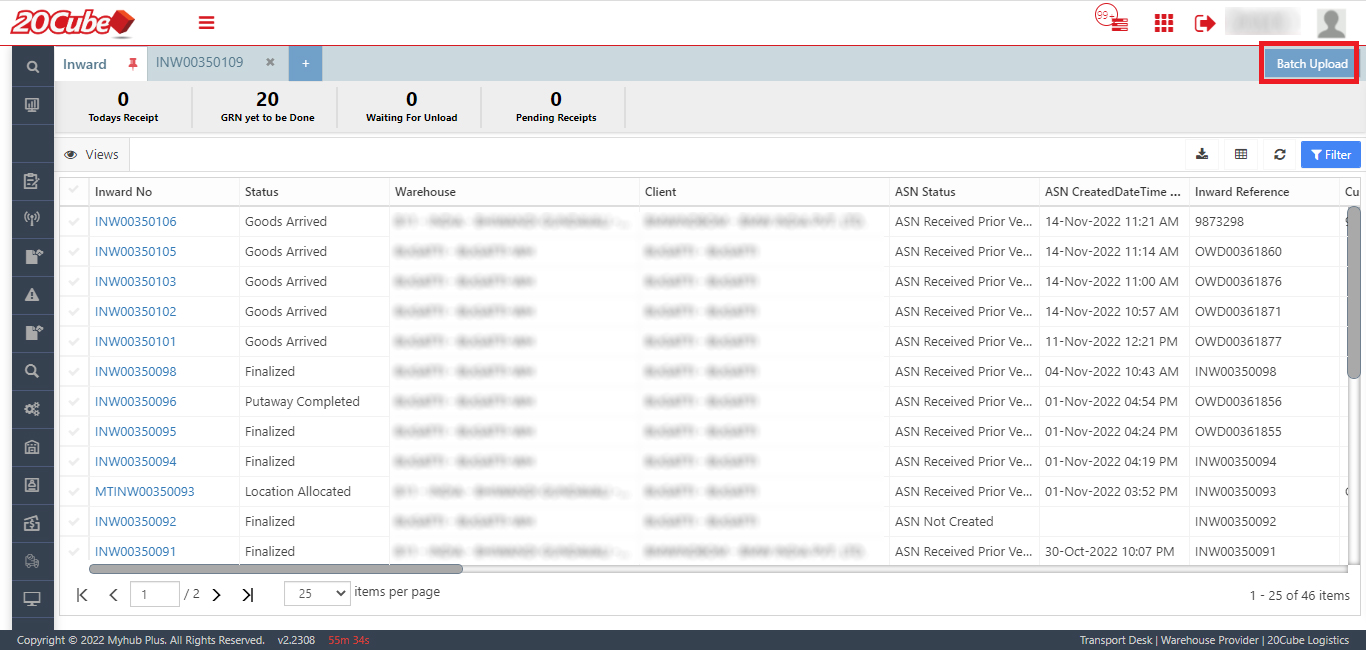
1. Click on the Batch Upload button in the Inward grid
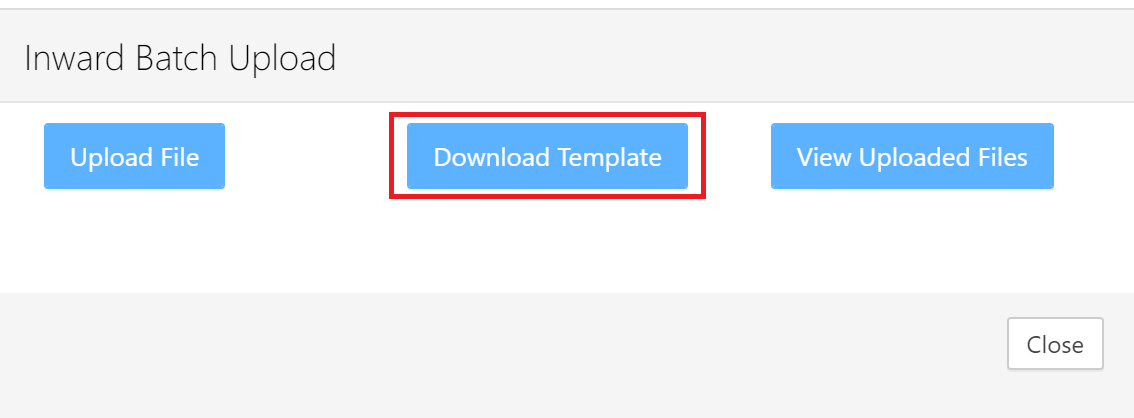
2. Download the template available in the excel format
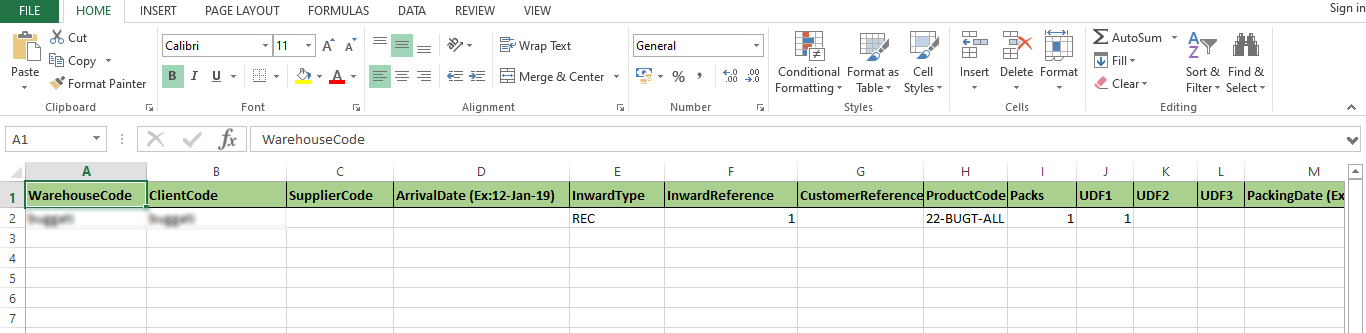
3. Fill the inward order details & save the file
4. Upload the saved file using the Upload file button in the Batch Upload window

5. View the uploaded file to check your inward file status (whether the upload is a success or in progress)
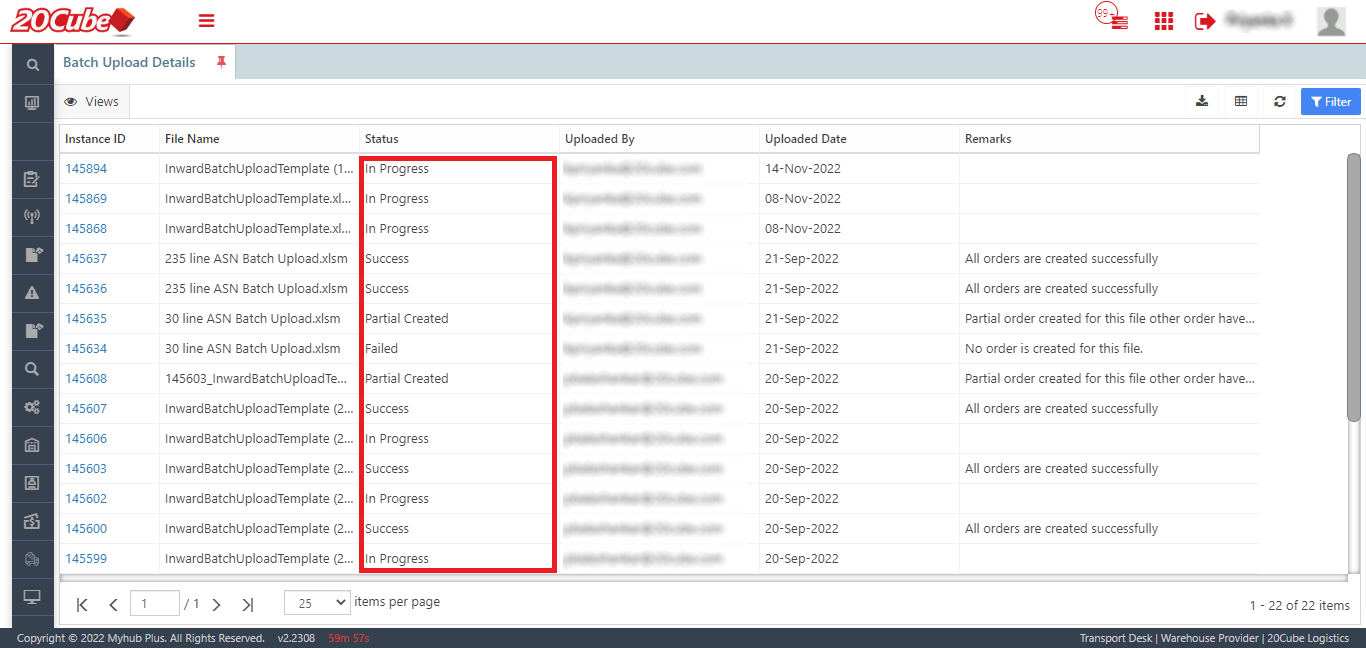
Once done, inward orders will be created in one-time. It does save you a lot of time.

Know more about such features available on MyHubPlus. Check this feature today and share your feedback to connections@20cube.com


Previous Article

ETA Alerts: Keeps you informed on the ...

Next Article

Smartly manage the inventory stored at the ...

0
Shares
  • 0
  • +
  • 0
  • 0
  • 0
  • 0

Related articles More from author

  • blog

    Quick Manifest Creation for Timely Deliveries

    July 7, 2023
    By MyHub+
  • blog

    Configuring auto alerts for freight shipments

    December 29, 2023
    By MyHub+
  • Convert LCLs to FCLs
    blog

    Convert LCLs to FCLs

    June 19, 2019
    By MyHub+
  • blog

    Create Customised Reports

    April 29, 2020
    By MyHub+
  • blog

    MyHubPlus Solution at a glance

    April 29, 2019
    By MyHub+
  • blog

    Make quick deliveries with consignment bulk upload

    March 24, 2023
    By MyHub+

Leave a reply Cancel reply

  • blog

    Here’s how following up with suppliers is made easy

  • pickpack
    blog

    Pick it. Pack it. Sorted

  • blog

    New and Improved Booking Form with Added Information

  • Recent

  • Popular

  • Comments

  • Important Update: MyHubPlus Launches a New Restructured Menu

    By MyHub+
    October 8, 2024
  • Important Update: E-Forms Moved to Respective Menu on MyHubPlus

    By MyHub+
    May 11, 2024
  • Never Miss a Beat: MyHubPlus Push Notification

    By MyHub+
    April 15, 2024
  • Configuring auto alerts for freight shipments

    By MyHub+
    December 29, 2023
  • Reverse Logistics: Efficiently Managing the Pick-up Process for Returning Goods

    By MyHub+
    November 9, 2023
  • Here’s how following up with suppliers is made easy

    By MyHub+
    March 20, 2019
  • booking-appoval

    Pending Booking Approvals?

    By MyHub+
    March 22, 2019
  • Are exceptions delaying your shipments?

    By MyHub+
    March 27, 2019
  • A Power Packed Combo

    By MyHub+
    April 1, 2019
  • leadtime

    How we saved $450,000?

    By MyHub+
    April 4, 2019

Collaborative Platform

  • Global Trade Hub
  • Forwarding Hub
  • Warehousing Hub
  • Distribution Hub

Case Studies

  • Leading Fashion Retailer
  • Container Management
  • Telecom Equipment Provider
  • Leading Drainage Solutions
  • Leading Mining Company
  • B2C E-Commerce
  • Medical Equipment Company
  • Leading Retail Company

Company

  • Capabilities
  • Case Studies
  • Contact
  • Blog

Collaborative Platform

  • Global Trade Hub
  • Forwarding Hub
  • Warehousing Hub
  • Distribution Hub

Quick Links

  • Terms Of Use
  • Privacy Policy
  • Copyrights
  • Disclaimer
© 2020 MyHub+. All Rights Reserved.