MyHub+

Main Menu

  • Value Drivers
  • Hubs
    • Global Trade Hub
    • Forwarding Hub
    • Warehousing Hub
    • Distribution Hub
  • Resources
    • Blog
    • Case Studies
  • Contact Us

logo

  • Value Drivers
  • Hubs
    • Global Trade Hub
    • Forwarding Hub
    • Warehousing Hub
    • Distribution Hub
  • Resources
    • Blog
    • Case Studies
  • Contact Us
blog
Home›blog›Quick Manifest Creation for Timely Deliveries

Quick Manifest Creation for Timely Deliveries

By MyHub+
July 7, 2023
683
0
Share:

Are you still running to your desk to create a manifest for consignment deliveries after a call with the third-party couriers?

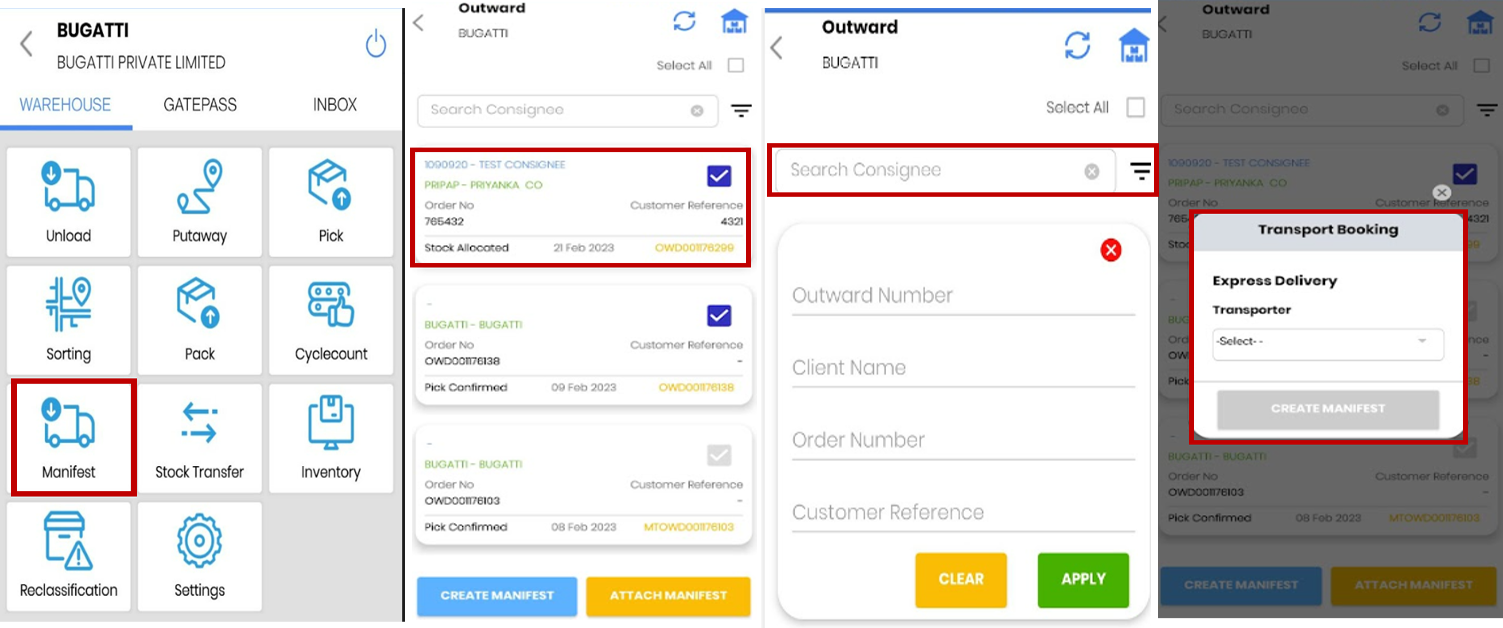
Not anymore, as now you can use the new Manifest Create feature available on the Mobile App of MyHubPlus. Using the app, the user sitting away from his desk can seamlessly attach consignments/outwards to the manifests and connect them to the available transporter (third-party couriers) for timely delivery.

Get this done in a few simple steps:

  • Using the Manifest grid on the MyHubPlus mobile app, the user can select the outwards/consignments that have the status either as stock allocated, pick confirmed or pick completed and attach it to the Manifest. This can be done either manually or using the scanner.
  • Next, confirm the consignee code for the manifest quick delivery.
  • Once done, connect to the transporter and attach the manifest.
Quick Manifest Creation for Timely Deliveries

Previous Article

Simplify Search with Quick Global Search

Next Article

Attach Bulk Orders to Manifest in Records ...

0
Shares
  • 0
  • +
  • 0
  • 0
  • 0
  • 0

Related articles More from author

  • Real-Time Warehousing Dashboards – Vehicle TAT Dashboard
    blog

    Manage the vehicles movement in the warehouse!

    March 19, 2021
    By MyHub+
  • Dedicated & Informative Customer Portal
    blog

    Dedicated & Informative Customer Portal

    January 18, 2021
    By MyHub+
  • Stop switching tabs
    blog

    Stop switching tabs

    July 2, 2019
    By MyHub+
  • Borders
    blog

    Borders, timezones, and more.

    May 13, 2019
    By MyHub+
  • Buyer's unique data now easy to add!
    blog

    ‘Customized Data’ at order level booking?? No problem!

    March 16, 2021
    By MyHub+
  • blog

    Make quick deliveries with consignment bulk upload

    March 24, 2023
    By MyHub+

Leave a reply Cancel reply

  • Import Container Management
    blog

    Container Management contd.

  • Supplier Follow-up
    blog

    Keep your supplier informed

  • Ensure Perfect Count of the Inventory
    blog

    Ensure Perfect Count of the Inventory

  • Recent

  • Popular

  • Comments

  • Important Update: MyHubPlus Launches a New Restructured Menu

    By MyHub+
    October 8, 2024
  • Important Update: E-Forms Moved to Respective Menu on MyHubPlus

    By MyHub+
    May 11, 2024
  • Never Miss a Beat: MyHubPlus Push Notification

    By MyHub+
    April 15, 2024
  • Configuring auto alerts for freight shipments

    By MyHub+
    December 29, 2023
  • Reverse Logistics: Efficiently Managing the Pick-up Process for Returning Goods

    By MyHub+
    November 9, 2023
  • Here’s how following up with suppliers is made easy

    By MyHub+
    March 20, 2019
  • booking-appoval

    Pending Booking Approvals?

    By MyHub+
    March 22, 2019
  • Are exceptions delaying your shipments?

    By MyHub+
    March 27, 2019
  • A Power Packed Combo

    By MyHub+
    April 1, 2019
  • leadtime

    How we saved $450,000?

    By MyHub+
    April 4, 2019

Collaborative Platform

  • Global Trade Hub
  • Forwarding Hub
  • Warehousing Hub
  • Distribution Hub

Case Studies

  • Leading Fashion Retailer
  • Container Management
  • Telecom Equipment Provider
  • Leading Drainage Solutions
  • Leading Mining Company
  • B2C E-Commerce
  • Medical Equipment Company
  • Leading Retail Company

Company

  • Capabilities
  • Case Studies
  • Contact
  • Blog

Collaborative Platform

  • Global Trade Hub
  • Forwarding Hub
  • Warehousing Hub
  • Distribution Hub

Quick Links

  • Terms Of Use
  • Privacy Policy
  • Copyrights
  • Disclaimer
© 2020 MyHub+. All Rights Reserved.